Marketing use case

Reveal Images for Product Launches

A product reveal image can turn one launch asset into a small interaction. The visible state establishes the category or problem, while the hidden state shows the feature, redesign, result, or offer. The best version supports the launch message instead of hiding information people need to make a decision.

Visual guide

The complete workflow in one view

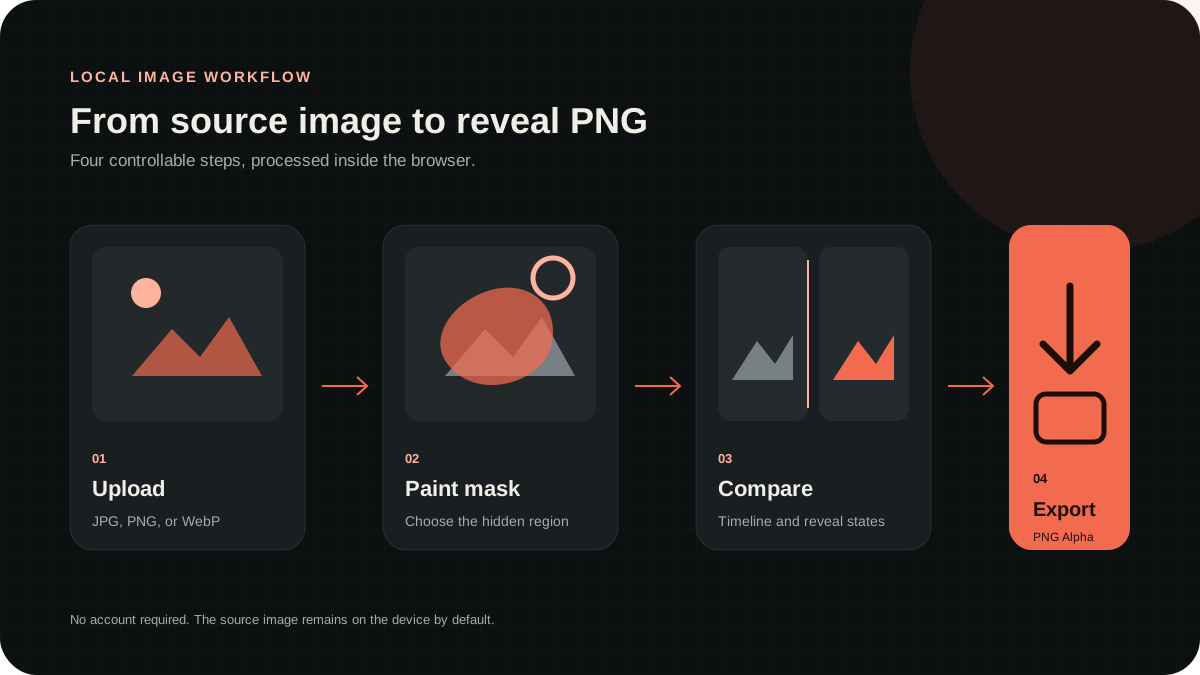
Upload a source image, paint the hidden region, compare both states, then export a PNG that preserves alpha.

Four-step diagram showing upload, mask, preview comparison, and transparent PNG export
Workflow

From upload to transparent PNG

Upload, mask, preview, and export without sending the source image to an image-processing server.

  1. 1Define the launch payoff
  2. 2Mask the new detail
  3. 3Add one CTA
  4. 4Test before the campaign

Reveal the payoff, not the context

Keep the product category, brand, or before state visible. Hide the new interface, final color, feature detail, result, or launch code that completes the story.

If the timeline state contains no context, the post can look like a broken asset. A recognizable setup makes the interaction feel deliberate and protects message clarity.

Use one conversion action

Pair the image with one next step, such as joining a waitlist, opening a launch thread, trying a demo, or visiting a product page. Do not combine several competing links.

The reveal earns attention, but the caption still needs to explain what the product is. Use the visual interaction for the new detail, not as a replacement for a clear value proposition.

Prepare a compression-safe asset

Use large product shapes, short text, and clean contrast. Small interface labels and thin strokes can disappear after resizing, so test the composition at the same size people will see in the feed.

Start with Standard for screenshots and photography. Use Dark Reveal for shadow-heavy hardware images, or increase contrast carefully when the before and after states are too similar.

Test before launch day

Export the original PNG and publish a private or low-risk test. Check both mobile and desktop if the launch depends on the effect. Platform behavior can change without notice.

Keep a normal static version ready as a fallback. A reveal image is a campaign format, not the only place where essential product information should exist.
FAQ

Common questions

Does RevealStudio upload my original image?+

No. The MVP editor processes jpg, png, and webp files in the browser with Canvas. The image is not sent to a server by default, which keeps creator drafts private.

Why should the output be PNG?+

PNG keeps the alpha channel. The transparent area is what lets a reveal image behave differently between a compressed timeline preview and a long-press or expanded view.

Why can the result look different after posting to X?+

Social platforms resize, compress, and preview images differently. RevealStudio gives a browser preview and conservative export defaults, but the final result can vary after platform processing.

Create a reveal image in your browser

No account is required. The source image stays on your device while you prepare the transparent PNG.

Open editor