A focused image workflow for X creators
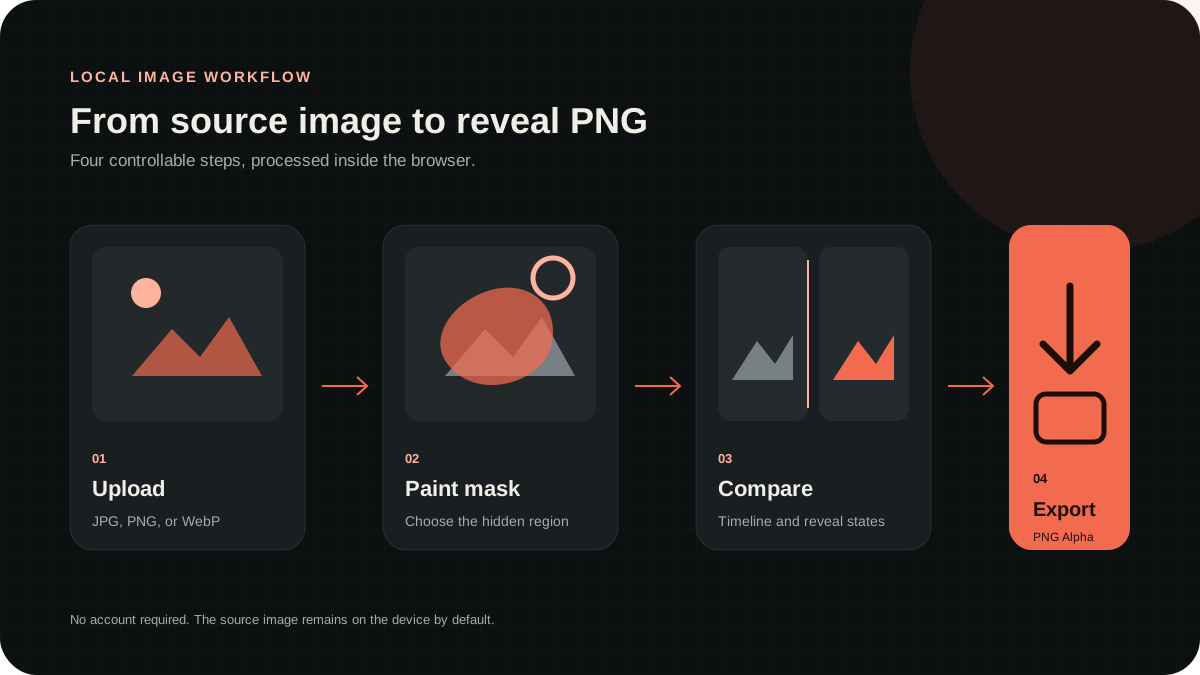
RevealStudio focuses on one practical X image workflow: preparing transparent PNGs for tap-and-hold reveals, hidden images, spoilers, art variants, and compact product teasers. The editor runs in the browser, so creators can move from a source image to a downloadable result without registering or uploading the original to an image-processing server.
The current MVP is intentionally narrow. It is not a full social media scheduler, analytics suite, or desktop design application. It provides masking, templates, parameter controls, dual previews, PNG generation, download information, and reusable publishing copy for a fast creator task.
Choose the right X image format
Use a transparent PNG when the post depends on alpha or a reveal state. Use a normal PNG when you need crisp graphics or text without transparency. Use JPG for ordinary photographs where smaller files matter and no transparent pixels are needed. RevealStudio always exports PNG because its core workflow depends on alpha.
Keep the original master file outside X. The platform may resize or recompress the upload, and downloading the posted version may not preserve the same pixel data. If you need to revise the mask or publish another variant, return to the original source and the locally generated PNG.
Create tap-and-hold and hidden images
Upload the source and paint the region that should be hidden in the first state. Use brush size and hardness to control the boundary, the eraser for corrections, and reverse selection when most of the image should become transparent. Undo protects the recent masking steps.
Choose Standard for a neutral result, Anime Reveal for colorful illustration, Glow Reveal for bright effects, or Dark Reveal for shadow-heavy sources. Tune Reveal Strength before adding blur, contrast, or saturation. Both preview panels update from the same parameter state used for generation.
Prepare images that work in a fast feed
Use a strong focal point and keep important information away from extreme edges. X can display different crops and sizes across devices and post layouts. Tiny captions, subtle gradients, and thin lines may disappear after compression, so evaluate the image at the same scale people will see while scrolling.
The timeline state should remain coherent before the reveal. Leave enough context to explain the subject, and hide one meaningful payoff. If the first state resembles a broken upload, erase part of the mask. If the second state is not noticeably different, strengthen or simplify the hidden region.
Use the tool for art, memes, spoilers, and products
Anime and AI art creators can conceal alternate expressions, costumes, effects, or background characters. Meme accounts can hide the punchline. Fandom communities can protect a spoiler while giving a clear warning. These formats work because one hidden detail changes the meaning of the visible setup.
Product teams can reveal a redesign, feature, code, result, or before-and-after state. Keep essential product information in the post text or linked page because the visual effect may vary by device. The reveal should support the campaign message rather than become its only accessible version.
Generate, download, and write the post
Generate the result after comparing the timeline and complete previews. The result card displays dimensions, PNG format, approximate size, and alpha status. Download reveal-output.png and avoid apps that convert it to JPG or flatten transparency before the file reaches X.
Use one direct caption instruction. “Tap and hold to reveal,” “Long press for the alternate version,” and “Press the image to see what changed” are clear starting points. Add a spoiler warning or one product CTA when relevant, but let the image carry the visual payoff.
Test around platform limitations
X controls the final crop, compression, background, preview behavior, and device-specific rendering. A valid transparent PNG can still appear different after posting. Publish a low-risk test before using the effect for an important launch, commission, announcement, or campaign.
Check mobile and desktop when the reveal is central to the post. Keep a normal static version ready as a fallback. RevealStudio helps with the controllable preparation steps, but no independent X image tool can guarantee how every future platform update will display the file.